
Digital memorial planning, in its AI-driven form, is the intentional process of capturing a loved one's voice, stories, and personality during their lifetime so that family members can access and interact with those memories long after they are gone. It is not a funeral website or an online obituary. It is a living archive, built from real recordings and guided conversations, that uses AI to make those memories searchable, playable, and conversational.
What you need to know right now:
- AI-based digital memorial planning captures authentic audio, video, photos, and documents and organizes them into an interactive memory system.
- It is designed for families who want to preserve a loved one's voice and perspective while that person is still alive, not only after loss.
- The clearest next step: start recording one story this week, even on your phone, before the moment passes.
Table of Contents
- What does digital memorial planning actually mean?
- How is an AI living legacy actually created?
- What technologies power a living legacy?
- Consent, ethics, and security: what to settle before you record
- How to start: a practical checklist and timeline
- What do families actually get from a living legacy?
- How Senarra puts this plan into practice
- Key Takeaways
- Why the voice matters more than the photo album
- Senarra's free trial: what to prepare before you begin
What does digital memorial planning actually mean?
Digital memorial planning is the intentional process of capturing, organizing, and enabling interactive access to a loved one's life story, voice, and personality using AI techniques such as Retrieval-Augmented Generation (RAG) and voice recordings. That definition has a firm boundary: it covers AI-driven living legacy work, not post-death tribute pages or funeral arrangements.
The use cases fall into three broad categories. Families building a multi-generational heirloom want grandchildren to hear a grandparent's voice decades from now. People doing end-of-life planning want to leave behind something more personal than a will. And families doing active memory work want to capture a parent with dementia, or simply a parent who is still healthy, before stories fade.
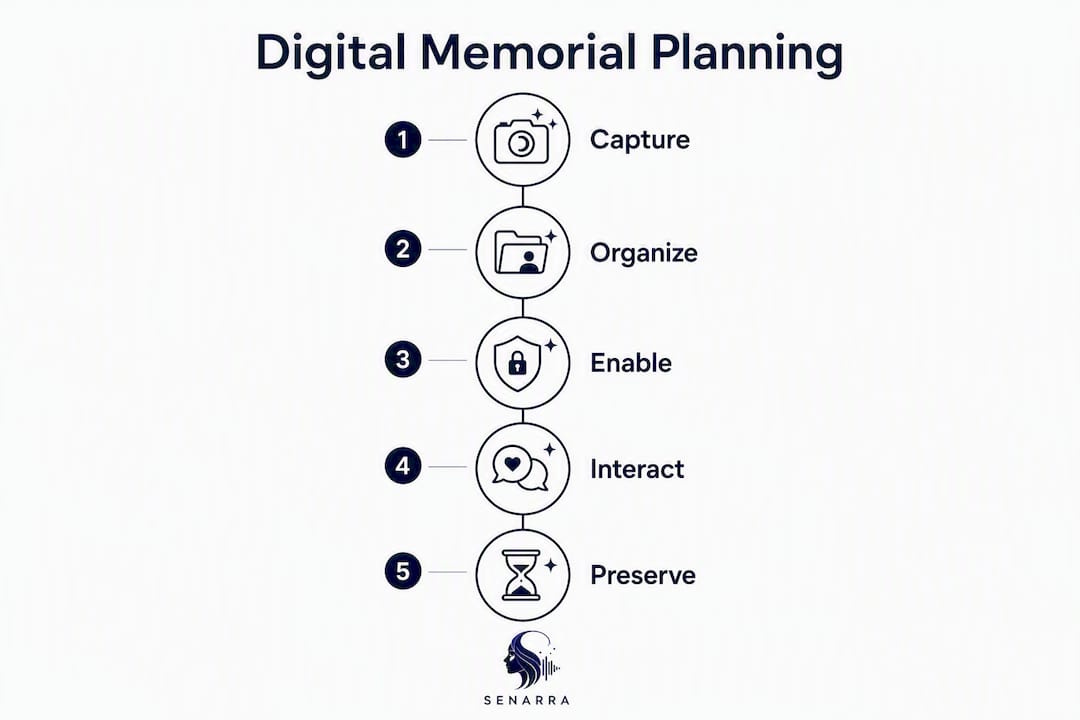
What separates this from a photo album or a cloud drive is the AI layer. Preserving wisdom rather than just content is the real goal: future generations inherit perspective and values, not only files. Senarra is one platform built around exactly this idea, combining voice cloning, guided interviews, and family collaboration into a single app.
How is an AI living legacy actually created?
The process is more structured than most families expect, and that structure is what makes the result usable.
- Plan and get consent. Decide whose story you are preserving and get their documented, specific, revocable permission before recording anything. This step is non-negotiable.
- Run guided interviews. Use structured prompts that ask for concrete anecdotes, not open-ended questions. "Tell me about the day you met Dad" produces far richer material than "Tell me about your life."
- Upload supporting materials. Add photos, home videos, voicemails, letters, and biographical documents. Each file becomes context the AI can draw on.
- Transcription and indexing. Automatic speech recognition (ASR) converts audio to text. That text is indexed so the system can retrieve specific memories later.
- RAG model training. The indexed memories feed a Retrieval-Augmented Generation layer, which grounds AI responses in real source material rather than invented content.
- Delivery. The finished system supports interactive chat, authenticated voice playback, a phone-accessible memory line, and animated video memories.
Guided interview prompts and biographical uploads are the core inputs that shape how accurately the final assistant reflects the person's actual communication style. An experimental evaluation of one memorial conversational system reported voice naturalness at 4.2/5.0, persona consistency at about 82% accuracy, and participant comfort near 4.1/5.0 on a 5-point scale, which gives a realistic benchmark for what families can expect.
Pro Tip: Favor recorded authentic clips over AI-generated synthetic messages wherever possible. Real audio of a person laughing, pausing, or choosing their words is irreplaceable. Synthetic voice should supplement, not replace, those recordings.
Quick recording checklist to start today:
- One story about childhood or early life (10–15 minutes)
- One story about a pivotal decision or life lesson
- A favorite recipe, song, or ritual explained in their own words
- A direct message to a grandchild or future family member
- Any existing voicemails or home videos worth uploading
What technologies power a living legacy?
| Technology | Role in the pipeline | Practical implication |
|---|---|---|
| ASR (automatic speech recognition) | Converts recorded audio to searchable text | Audio quality directly affects transcription accuracy |
| Indexed memory store | Organizes transcripts and documents for fast retrieval | More specific source material produces better answers |
| RAG (Retrieval-Augmented Generation) | Grounds AI responses in real memories, not hallucinations | Responses stay anchored to what the person actually said |
| Neural TTS / voice cloning | Reproduces the person's voice for playback | Requires explicit consent; authentic clips are always preferable |
The full pipeline runs from raw audio through ASR transcription, into an indexed memory store, then through RAG and a large language model for conversational responses, and finally through neural text-to-speech for voice output. Each stage has a limit worth knowing: RAG retrieves real memories, but the language model still adds conversational connective tissue. That means the system is only as good as the source material fed into it. Quiet-room recordings with a decent phone microphone and consistent metadata (who is speaking, when, what the topic is) dramatically improve what comes out the other end.
Consent, ethics, and security: what to settle before you record
This is the section most families skip, and it is the one that causes the most problems later.
Consent fundamentals:
- Consent must be documented, specific to each use (chat, voice cloning, family sharing), and revocable at any time.
- Decide in advance who can change access settings after the person passes, and name that person explicitly in your account settings.
- Legal questions around data ownership and posthumous control remain unresolved in most jurisdictions. Read the platform's terms carefully before uploading, and confirm you retain the right to export and delete your data.
Pro Tip: Limit voice playback access to named family members only, and never share a cloned voice file outside the platform. The fraud risk is real: a convincing voice clip in the wrong hands can be used in phone scams targeting elderly relatives.
On the security side, look for end-to-end encryption, regular backups, and a clear data export option. If a provider's terms grant them a license to reuse your content for model training, that is a red flag worth escalating before you sign up.
How to start: a practical checklist and timeline
What to gather first:
- Audio letters or recorded stories (even phone voice memos count)
- Favorite family photos with dates and names noted
- Home videos, even short clips
- Key documents: letters, diaries, military records, immigration papers
- Existing voicemails you want to preserve
| Phase | Timeline | Core tasks |
|---|---|---|
| Quick start | 1–2 weeks | Record 3–5 stories, upload existing photos and voicemails, configure consent and access settings |
| Moderate build | 1–3 months | Complete guided interview series, add supporting documents, invite 2–3 family contributors |
| Comprehensive archive | 3+ months | Full interview library, annotated media, multi-generational contributions, regular update schedule |
Most platforms follow a free trial model (Senarra offers 14 days) followed by subscription tiers. Entry-level tiers typically cover basic storage and chat. Higher tiers unlock voice cloning, animated video memories, and expanded family collaboration. Cost rises with storage volume and the number of contributors.
Involving family members early distributes the recording work and surfaces stories one person alone would never think to ask about. Assign one family member to coordinate uploads and another to run interview sessions.
What do families actually get from a living legacy?
The outputs are more varied than most people expect when they first hear "digital memorial."
Interactive memory chat lets family members ask questions and receive answers grounded in the person's actual recorded memories. A grandchild born after a grandparent's death can ask what they were like at 30, and the system draws on real stories to respond.
Authenticated voice playback delivers short clips of the person's actual voice, organized by topic or date. These work well at family gatherings, anniversaries, or simply when someone misses hearing a familiar voice.
Phone-accessible memory line means family members can call a number and hear a recorded message or story. No app required. This matters for older relatives who are not comfortable with smartphones.
Animated video memories combine photos, voice, and text into short video keepsakes. Keep clips under two minutes for the most impact; longer clips lose attention quickly.
Pet personas extend the same concept to beloved animals, using photos, videos, and descriptions to build a personality-driven memory of a pet.
For all output types, authentic recorded clips carry more emotional weight than synthetic generation. Use AI-generated voice only where a real recording does not exist and explicit consent covers that use. Attach metadata to every clip: who is speaking, the approximate date, and the context.
How Senarra puts this plan into practice
Senarra maps directly to every step described above. Its guided interview feature prompts users with specific questions designed to surface concrete anecdotes rather than vague summaries. Voice cloning captures the person's authentic vocal character for playback. The memory line lets family members call in and hear stories without needing the app. Family collaboration tools allow multiple contributors to add photos, videos, and recordings to the same archive.
Core features at a glance:
- Guided interview prompts that elicit specific, story-rich responses
- Voice cloning for authentic audio playback, with consent controls built in
- Phone-accessible memory line for family members of any tech comfort level
- Animated video memories combining photos, voice, and text
- Pet personas for preserving memories of beloved animals
- Secure family sharing with role-based access controls
- Export options so your archive is never locked to one platform
Senarra also supports capturing elder narratives with prompts calibrated for older adults, which reduces the friction that often stalls families before they even start. The 14-day free trial gives families enough time to complete a first interview session and upload existing media before committing to a subscription.
Key Takeaways
AI-based digital memorial planning works when families start early, record authentic voice material, document consent explicitly, and choose a platform that gives them full data ownership.
| Point | Details |
|---|---|
| Start while the person is living | The most valuable recordings happen before loss, not after — authentic voice cannot be recreated from memory. |
| Consent must be documented | Specific, revocable permission for each use (chat, voice cloning, sharing) protects everyone involved. |
| Source quality drives output quality | Quiet-room audio, concrete interview prompts, and consistent metadata produce far better results than casual recordings. |
| Check ownership terms before uploading | Unresolved legal questions around data rights mean you should confirm export and deletion rights before committing to any platform. |
| Senarra covers the full pipeline | Guided interviews, voice cloning, memory line, family collaboration, and pet personas are all available with a 14-day free trial. |
Why the voice matters more than the photo album
Most families I have seen approach this process think they are building an archive. What they are actually building is a way for someone who never met their grandmother to understand how she thought. That is a fundamentally different goal, and it changes every decision you make along the way.
The emotional complexity here is real. Some family members find voice playback deeply comforting. Others find it unsettling, particularly in the early months after a loss. Neither response is wrong. The healthiest use pattern treats the memorial as a resource to return to when you are ready, not a replacement for grief or a substitute for the person. Families who set that expectation up front tend to use the archive more freely over time.
One practical note: plan to update the memorial. Add new photos, record new stories from relatives who were not involved at first, and revisit the access settings as family circumstances change. A living legacy stays useful precisely because it grows.
Senarra's free trial: what to prepare before you begin
Senarra's free trial gives you full access to the core features, including guided interviews and family sharing, before any subscription charge. The subscription model offers tiered plans available through in-app purchase, with higher tiers unlocking voice cloning and animated video memories.
Before you open the app, gather these items so your first session has real material to work with:
- Three to five audio recordings or voice memos (any length)
- A folder of photos with approximate dates
- Any voicemails you want to preserve
- A short list of five stories you most want to capture
Configure your privacy and consent settings on day one. Name the family members who will have access, set their permission levels, and confirm that you retain full export rights over everything you upload. That five-minute setup protects the archive for decades.
Start your free trial at Senarra and record your first story today. The right moment to begin is always earlier than it feels.